AI Video Script Generator for Nonprofits – Create Effective Videos [Start for Free]

AI Video Script Generator for Nonprofits Create Effective Videos Start for Free

Video can help nonprofits explain their mission, show impact, build trust, and move people to take action. The hard part is often not filming. It is writing the script.

A blank page can slow down even the best content team. You know what you want to say, but shaping it into a clear, engaging video takes time. An AI Video Script Generator helps you get past that first hurdle by turning a rough topic, campaign goal, or message into a structured draft you can improve and publish. HubSpot notes that AI can help writers move past the blank page and generate quality video scripts faster when prompts are clear and specific.

For nonprofits, this matters because video content often needs to do a lot at once. It may need to educate, inspire, build credibility, and drive donations or signups. AI can help your team create a stronger first draft faster so you can spend more time refining the message, adding real stories, and making the video feel human.

Once you’ve landed on a brilliant video idea, pause before diving into production. Writing your video script is the next crucial step. Let’s see how an AI Video Script Generator can help you create more effective videos!

In this guide, we’ll explore an easy yet impactful approach to scriptwriting. Plus, we’ll introduce how leveraging an AI Video Script Generator can spark creativity and generate fresh ideas.

Ready to delve in? Let’s embark on this scriptwriting journey!

Need better formatting fast? Try our free tools: case converter, title case converter, and sentence case converter.

Chapters

How an AI Video Script Generator Works [Video Tutorial]

Using an AI Video Script Generator
How to use an AI Video Script Generator

AI has the power to ignite your creative process, offering unique perspectives and exciting ideas. Let’s explore how an AI Video Script Generator can assist in crafting innovative scripts, enabling us to pick the standout option for our video.

This process is swift, taking just a few moments, but it can significantly enhance both the creativity and quality of your video script.

For our demonstration, we’ll select the following:

  • Length: 2 minutes
  • Input (prompt): how to write a video script
  • Tone: Storytelling

You can change the settings and run the AI Video Idea Generator as often as you need to get the creativity for writing the perfect video script.
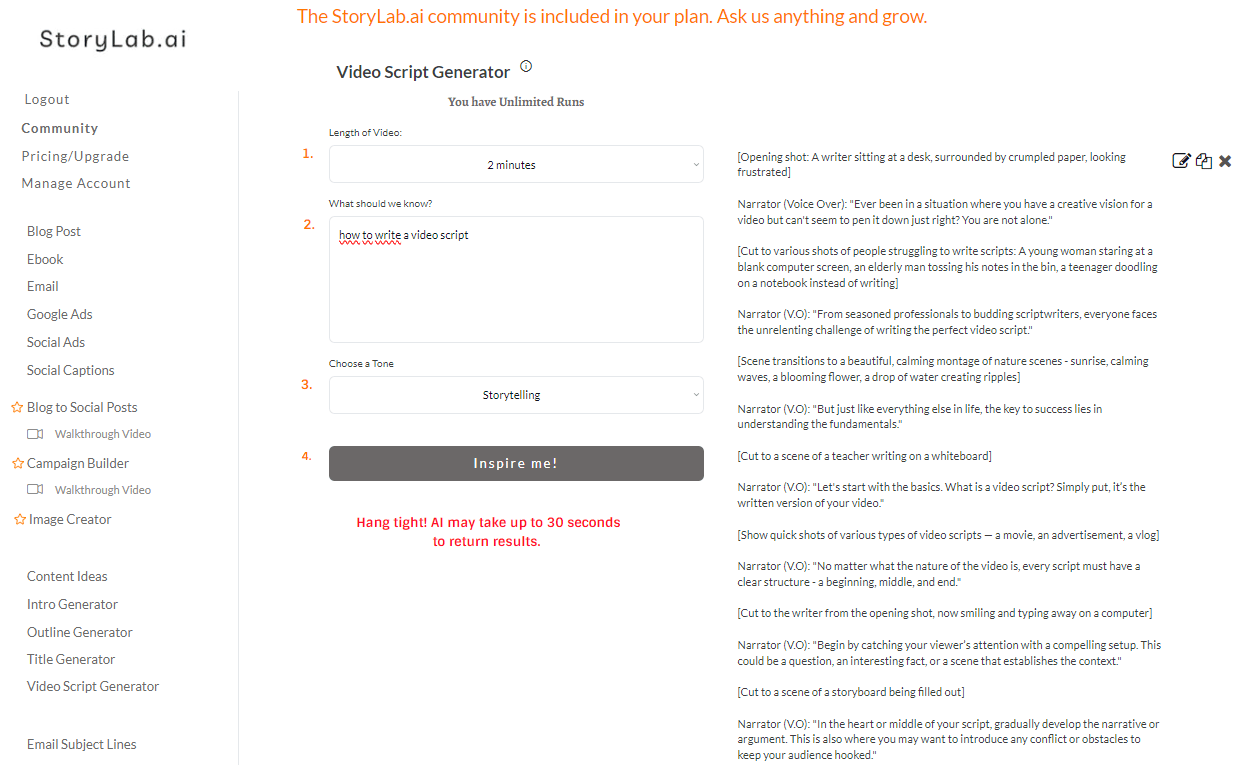
AI Video Script Generator Example Write Video Script

AI Video Script Generator Example Output:

[Opening shot: A writer sitting at a desk, surrounded by crumpled paper, looking frustrated]

Narrator (Voice Over): “Ever been in a situation where you have a creative vision for a video but can’t seem to pen it down just right? You are not alone.”

[Cut to various shots of people struggling to write scripts: A young woman staring at a blank computer screen, an elderly man tossing his notes in the bin, a teenager doodling on a notebook instead of writing]

Narrator (V.O): “From seasoned professionals to budding scriptwriters, everyone faces the unrelenting challenge of writing the perfect video script.”

[Scene transitions to a beautiful, calming montage of nature scenes – sunrise, calming waves, a blooming flower, a drop of water creating ripples]

Narrator (V.O): “But just like everything else in life, the key to success lies in understanding the fundamentals.”

[Cut to a scene of a teacher writing on a whiteboard]

Narrator (V.O): “Let’s start with the basics. What is a video script? Simply put, it’s the written version of your video.”

[Show quick shots of various types of video scripts — a movie, an advertisement, a vlog]

Narrator (V.O): “No matter what the nature of the video is, every script must have a clear structure – a beginning, middle, and end.”

[Cut to the writer from the opening shot, now smiling and typing away on a computer]

Narrator (V.O): “Begin by catching your viewer’s attention with a compelling setup. This could be a question, an interesting fact, or a scene that establishes the context.”

[Cut to a scene of a storyboard being filled out]

Narrator (V.O): “In the heart or middle of your script, gradually develop the narrative or argument. This is also where you may want to introduce any conflict or obstacles to keep your audience hooked.”

[Cut to a scene of a movie director yelling “CUT!”]

Narrator (V.O): “Finally, end with a satisfying resolution. Whether it’s a plot twist, a solution to a problem, or a poignant message, make sure it resonates with your audience.”

[Final shot: The writer from the opening scene, now looking satisfied, leans back in his chair, taking a deep breath]

Narrator (V.O): “Remember, a good script is a balance of information and emotion. So, let your creativity flow and start crafting that stellar video script.”

[The screen fades to black, with the text appearing: “Everyone has a story to tell. What’s yours?”]

Narrator (V.O): “Keep practicing, stay patient, and most importantly, enjoy the process. Everyone has a story to tell. Now, it’s time to share yours.”

[End of video]

Best Practices Writing a Video Script
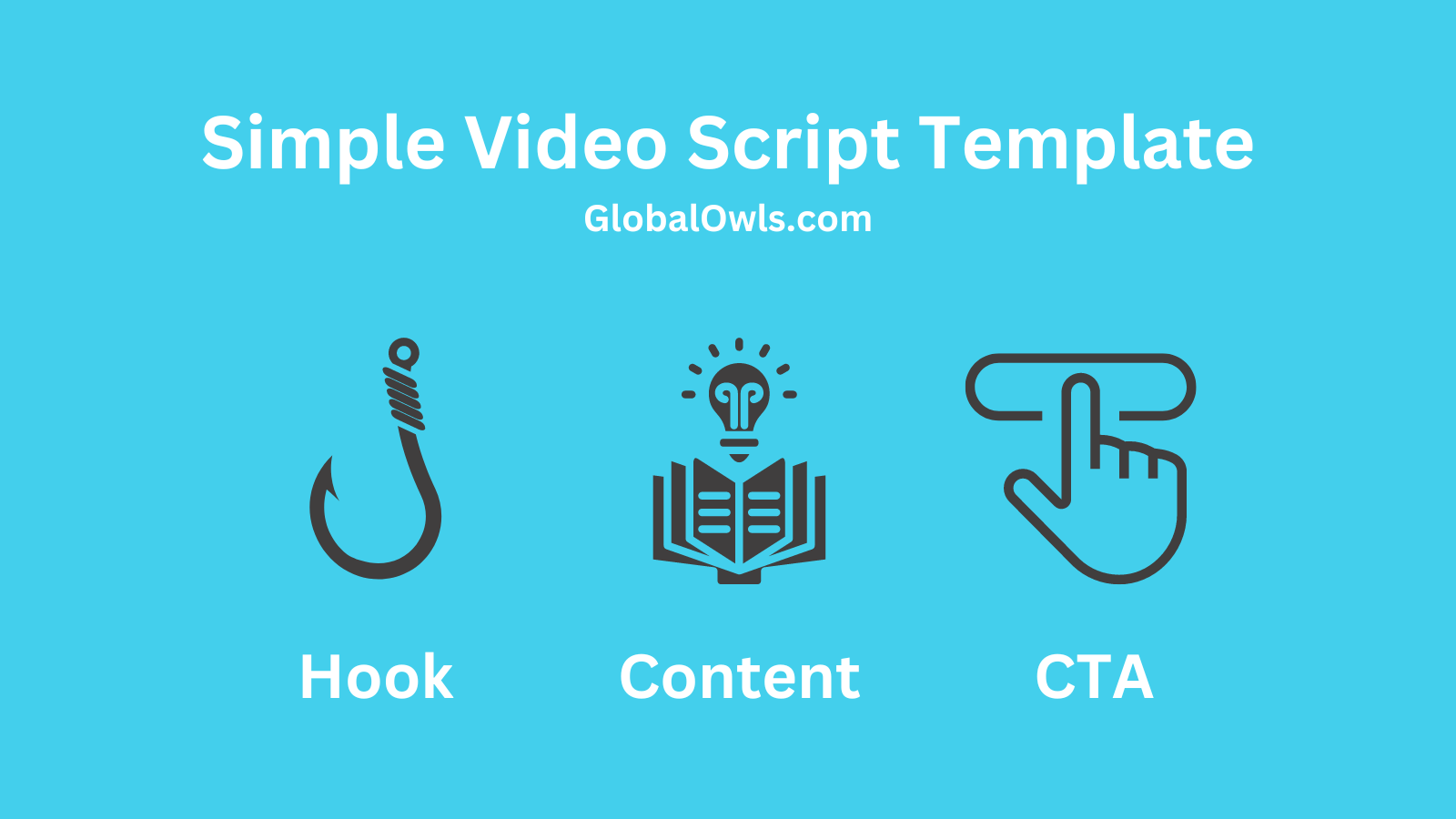
Simple Video Script Template

Let’s dive into crafting your video script.

Your script’s complexity is up to you. A straightforward approach might look like this:

Crafting Your Video Script’s Hook Your hook is crucial for capturing attention quickly, conveying your video’s value within the first moments, and encouraging viewers to stay tuned if the topic resonates with them.

There are many ways to design your hook, but the goal is always to halt the scroll (especially on social media) and spark enthusiasm for the entire video.

Examples of Effective Video Hooks:

  • Intriguing Question: Pose a question that arouses curiosity and promises intriguing insights.
  • Startling Statistic: Use an unexpected statistic to capture interest and lead into the heart of your video.
  • Personal Anecdote: Share a relatable story that engages viewers emotionally.
  • Bold Statement: Challenge prevalent beliefs with a striking claim that demands exploration.
  • Visual Shock: Begin with an arresting visual that piques curiosity about its context.
  • Promise of a Secret: Offer exclusive knowledge or a little-known fact that provides real value.
  • Direct Challenge: Engage viewers with a challenge that tests their knowledge or skills.
  • Humorous Scenario: Open with a humorous situation to build a connection through laughter.
  • Historical Mystery or Fact: Intrigue with a tale from the past that enlightens or surprises.
  • Immediate Action: Jump straight into an action, drawing viewers into the midst of an engaging narrative.

Developing Your Main Content Here, address the core issue and present your solution. This section is the crux of your video, so keep it concise and impactful.

Storytelling is powerful, yet focus on staying relevant to the topic at hand, avoiding detours into areas that might better suit a separate video.

Engagement Boosters Consider inserting a secondary hook midway to maintain viewer interest or prompt interactions like likes, comments, or subscriptions. It’s a strategy to add dynamism to your video without overwhelming your audience.

Concluding with a Call-to-Action (CTA) Wrap up by guiding viewers on their next steps. Whether it’s applying your advice, exploring your products/services, or directing them to another video, make the action clear and compelling to keep them engaged with your content continuum.

How nonprofits can use an AI Video Script Generator

Nonprofits create many kinds of videos, and each one needs a different structure. A fundraising appeal needs emotional clarity. A volunteer recruitment video needs energy and direction. An awareness video needs a simple message people can understand quickly.

An AI Video Script Generator can help your team create first drafts for donor updates, campaign videos, event promotion clips, volunteer onboarding videos, educational explainers, beneficiary stories, and social media content. Instead of starting from scratch every time, you can build from a draft and shape it around your mission, tone, and audience.

This can be especially helpful for small teams. You do not need to wait for the perfect opening line or ideal structure before moving forward. You can generate options, compare angles, and pick the one that fits your message best.

Why AI video scripting fits nonprofit marketing workflows

AI works best when it supports your team, not when it replaces your voice. In nonprofit marketing, that means using AI to speed up brainstorming, structure the script, and give your team a better starting point.

A strong workflow might begin with a campaign goal, supporter question, or program update. From there, AI can help turn that idea into an outline, opening hook, main talking points, and a call to action. Your team can then add the real-world examples, emotional nuance, brand voice, and impact details that make the script feel genuine.

This is one of the most practical ways nonprofits can use AI marketing tools. You reduce friction, publish more consistently, and free up time for creative decisions that actually need a human touch.

What to include in your prompt for better video scripts

Better prompts usually lead to better scripts. If you want stronger output, give the AI more direction.

Start with the audience, the goal of the video, and the platform. Then add the core message, tone, preferred length, and the action you want viewers to take next. You can also include details like whether the video should sound educational, emotional, urgent, community-focused, or story-driven.

For example, asking for a two-minute donor update script for a nonprofit helping families access food support will usually produce a better draft than simply asking for a fundraising video script. HubSpot recommends tailoring prompts and script templates so the output better matches audience needs and brand voice.

How to write scripts that hold attention longer

A script should not wander. It should guide the viewer from the first second to the final call to action.

That starts with the opening. Google’s video creative guidance emphasizes the importance of the first five seconds and recommends fast pacing and clear visual focus early in the video. For nonprofits, that could mean opening with a surprising fact, a short emotional moment, a direct question, or a clear statement of the problem you are solving.

The middle of the script should stay focused on one core message. Do not try to explain everything your organization does in one short video. Pick one topic, develop it clearly, and move the viewer toward one next step. A stronger script often says less, but says it better.

AI video scripts for fundraising, awareness, and donor trust

Nonprofits often need video content for different goals, and the script should match the job.

Fundraising videos need clarity around the problem, the solution, and the impact of support. Awareness videos need simple, memorable language that people can understand quickly. Donor trust videos need proof, transparency, and real examples that make your work feel credible.

An AI Video Script Generator can help you draft each of these faster, but the strongest result usually comes when you shape the final version around lived experience. Add a real quote. Include a specific outcome. Mention the people behind the work. That is what turns a generic script into something supporters remember.

How to turn one nonprofit topic into multiple video scripts

One good topic can become several strong videos.

A single campaign theme can become a short social script, a longer explainer, a donor thank-you video, a volunteer recruitment video, and a quick FAQ clip. This helps nonprofit teams get more value from one message without repeating the exact same content.

That also supports a smarter content system. Instead of treating video as one-off work, you can use AI to explore several script angles quickly and build a connected series that supports awareness, engagement, and action across different channels.

FAQ

What is an AI Video Script Generator?

An AI Video Script Generator is a tool that helps turn a prompt, topic, or outline into a video script draft. It can speed up ideation, structure your message, and help teams move past the blank page faster.

How can nonprofits use an AI Video Script Generator?

Nonprofits can use it to draft fundraising videos, donor updates, awareness campaigns, volunteer recruitment videos, educational explainers, and social media scripts. It is especially helpful for smaller teams that need to create more content without adding more manual work.

What makes a good AI-generated video script?

A good AI-generated video script starts with a clear prompt, stays focused on one message, uses a strong opening, and ends with a clear call to action. The best version is usually edited by a human so the tone, examples, and message feel real and trustworthy.

Why does the opening of a video script matter so much?

The opening matters because viewers decide quickly whether to keep watching. Google’s video creative guidance highlights the importance of capturing attention in the first five seconds with strong pacing and clear focus.

Should nonprofits publish AI-written video scripts without editing?

No. AI can help produce a fast first draft, but nonprofit teams should still review the script for accuracy, tone, emotional clarity, and mission alignment before publishing.

What should you include in a prompt to get a better AI video script?

Include the target audience, video goal, platform, preferred tone, key points, desired length, and the action you want viewers to take. More specific prompts usually produce stronger and more relevant script drafts.

Check out our latest Content

Articles, Images, Videos, and more!

Get a Christian Coloring Book this Christmas

Christian Coloring Book for Kids

Never get Stuck – Ask the AI Buddy Anything

AI Gardening App

Convert Text into any Case

Free Case Converter

Pros and Cons of Shopping

Online vs Traditional Shopping

Epic YT Title Examples

Fitness YT Title Examples

Earn $2000 a month!

AI Side Hustles from Home

Latest Videos