Video Ideas for Nonprofits: How to Find Better Ideas with AI

Video Ideas for Nonprofits How to Find Better Ideas with AI

Coming up with good video ideas is often harder than creating the video itself. Many teams do not struggle because they lack tools. They struggle because they are not sure what to make next.

That is where a smarter idea process helps. Instead of guessing, you can build video ideas around your audience, your goals, your existing content, and the questions people already care about. For nonprofits, this matters even more because every piece of content should support awareness, trust, community building, or fundraising.

AI can help speed up the process. It can suggest angles, expand rough topics, group related themes, and turn one strong idea into multiple video concepts for different channels. But the best results still come from combining AI with real audience insight and a clear marketing purpose.

In this guide, you will learn how to find stronger video ideas, how to use AI in a practical way, and how nonprofits can create videos that are more useful, more strategic, and easier to sustain over time.

Your Video Idea and Video Script are more important than your Video Editing Skills.

Check out how you can Come up With Effective Video Ideas With or Without AI.

In order to become successful with Video Marketing, you can’t simply create random videos. Check out how you can set up your Video Marketing Strategy as well and make sure your new video ideas match your strategy and goals.

Let’s first have a look at how you can come up with effective Video Ideas without an AI Video Idea Generator and later, we’ll show you how AI can help you come up with more specific ideas.

Need better formatting fast? Try our free tools: case converter, title case converter, and sentence case converter.

Chapters

1. Find Video Ideas in YouTube Search

Find Video Ideas in YouTube Search

Alright. This first one is pretty straightforward maybe, but YouTube Search is a great way to find new Video Ideas.

There are a couple of things you can do to use YouTube to help inspire you with some cool ideas.

1. Enter a Seed Keyword for your idea
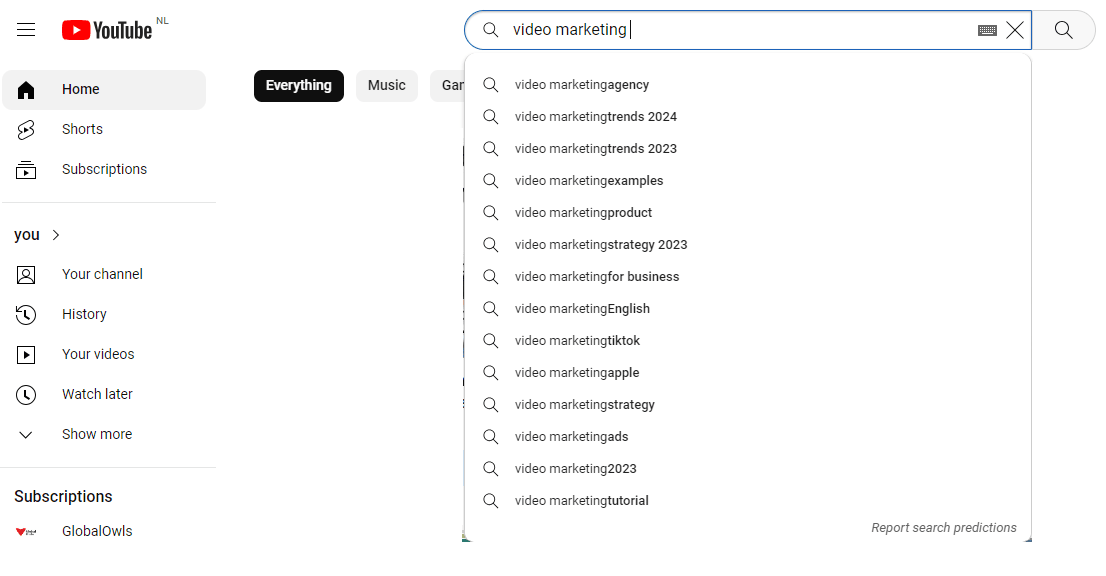
Come up with Video Ideas with YouTube Search

As you can see, YouTube will give you some nice ideas for your next video based on the keyword you entered.

You will probably not get enough video ideas this way. One thing you can do is enter new seed keywords, but you can also enter a random letter at the start of the seed keyword and YouTube will give you new ideas.

2. Enter a letter before the Seed Keyword for your idea

As you can see in the image below, by entering the letter ‘A’ before the seed keyword in YouTube Search, YouTube is providing us new ideas. You can do this with other letters as well and build up a list of cool ideas within minutes.
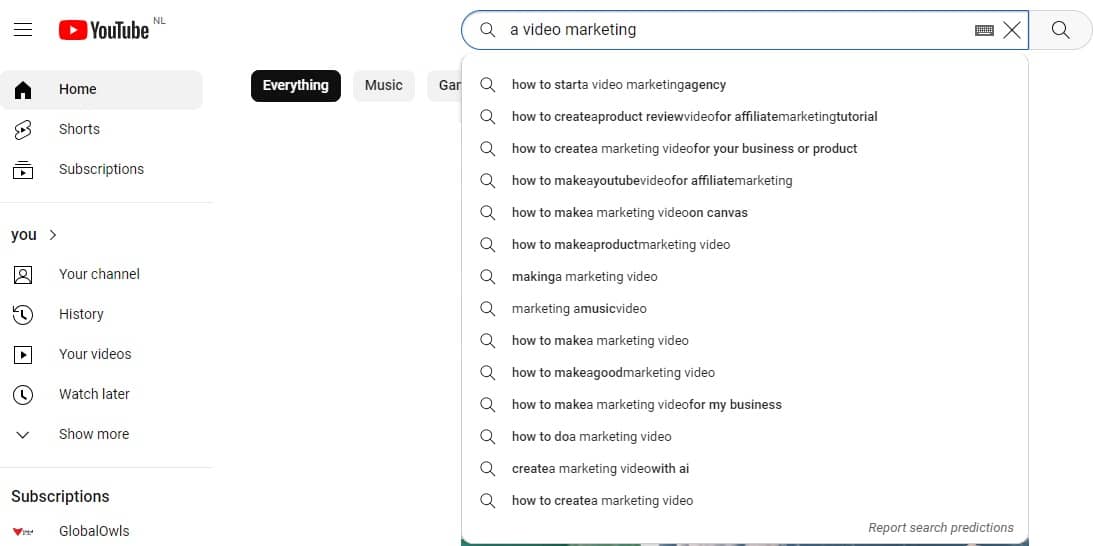
Come up with Video Ideas with YouTube Search Advanced

2. Find Video Ideas in YouTube Analytics

YouTube Analytics to Come up With new Video Ideas

This step is only possible if you’ve already published a couple of videos, but YouTube Analytics can help you find some great Video Ideas as well.

Look at your video stats and try to find out which videos have attracted the most views in the last 30 days and try to figure out if you can find new angles, if there are topics you might have missed, etc., and create new videos around that.

The benefits of coming up with new video ideas based on your analytics are the following:

  1. YouTube already identified you to be an authority on those topics
  2. You already know about these topics;
  3. Your audience already loves these topics;
  4. Data already showed that people are happy to consume content around these topics.

Here is how our YouTube Analytics looks at the moment of writing:
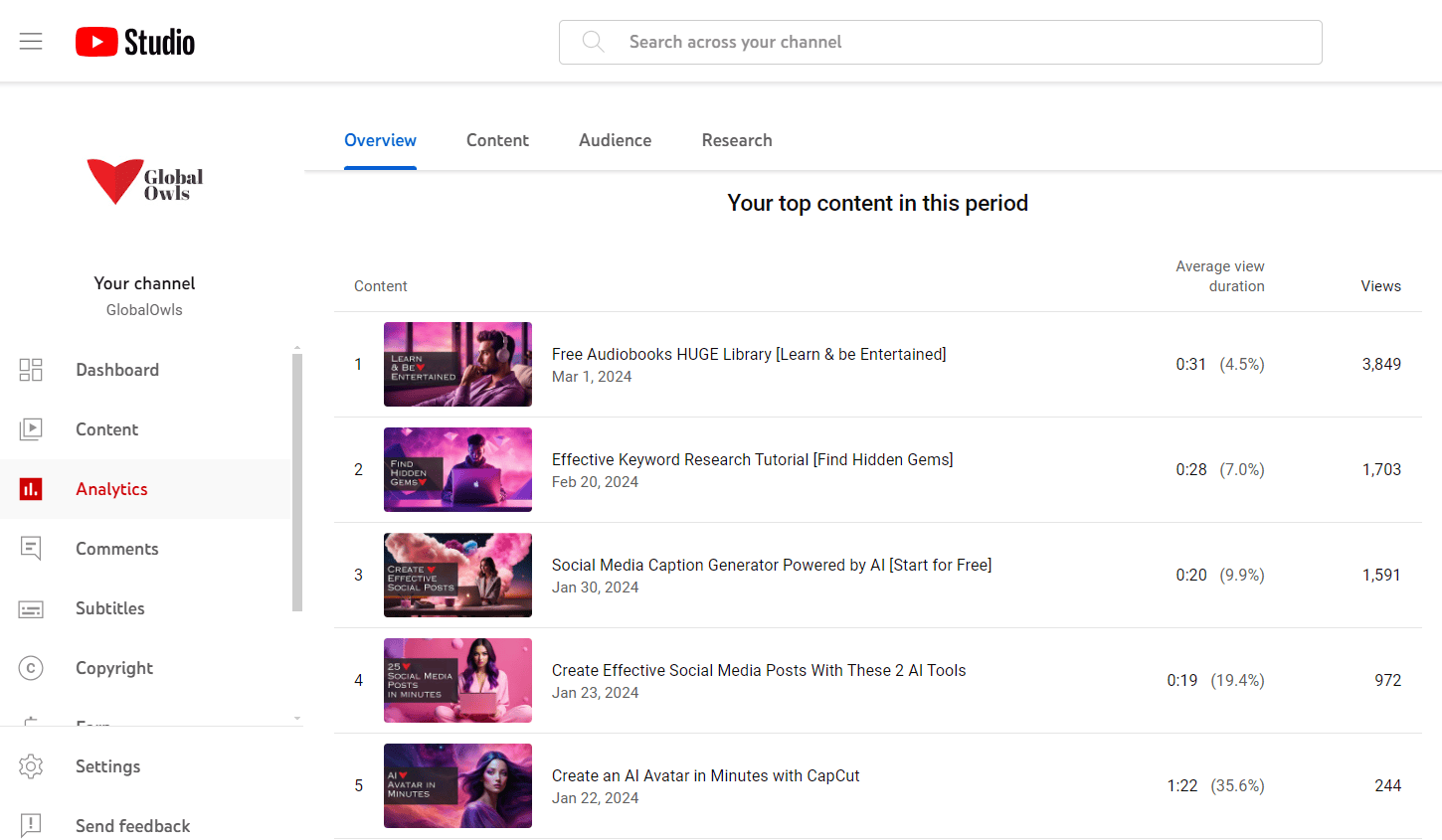
Use YouTube Analytics to Come up With Video Ideas

So we see that two of our top videos are about Social Media Posts and AI.

Alright, let’s see if an AI Video Idea Generator can help us come up with more ideas around those topics.

3. Use an AI Video Idea Generator

First, here’s a quick video on how an AI Video Idea Generator works:

So we’ve taken the seed keywords:

  • AI Social Media Post
  • Social Media Caption Generator

And entered it into the Video Idea Generator.

Here are the first ideas the AI Tool came up with when we chose a Comedic style:
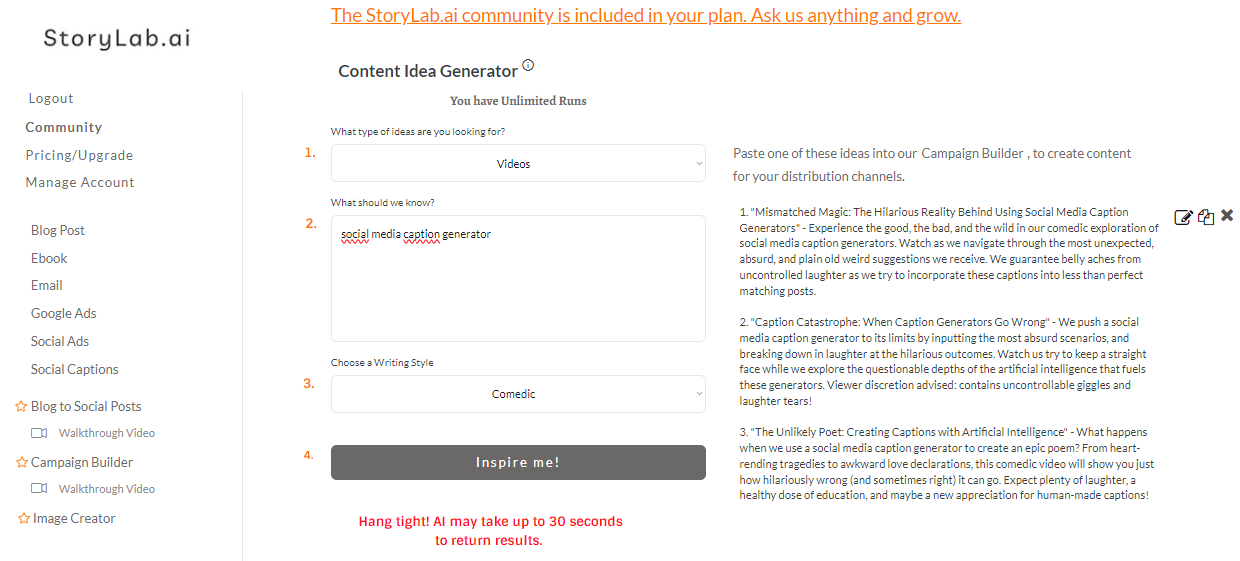
Video Idea Generator Comedic style example

Here’s what the Video Idea Generator came up with when we switched to a professional style:
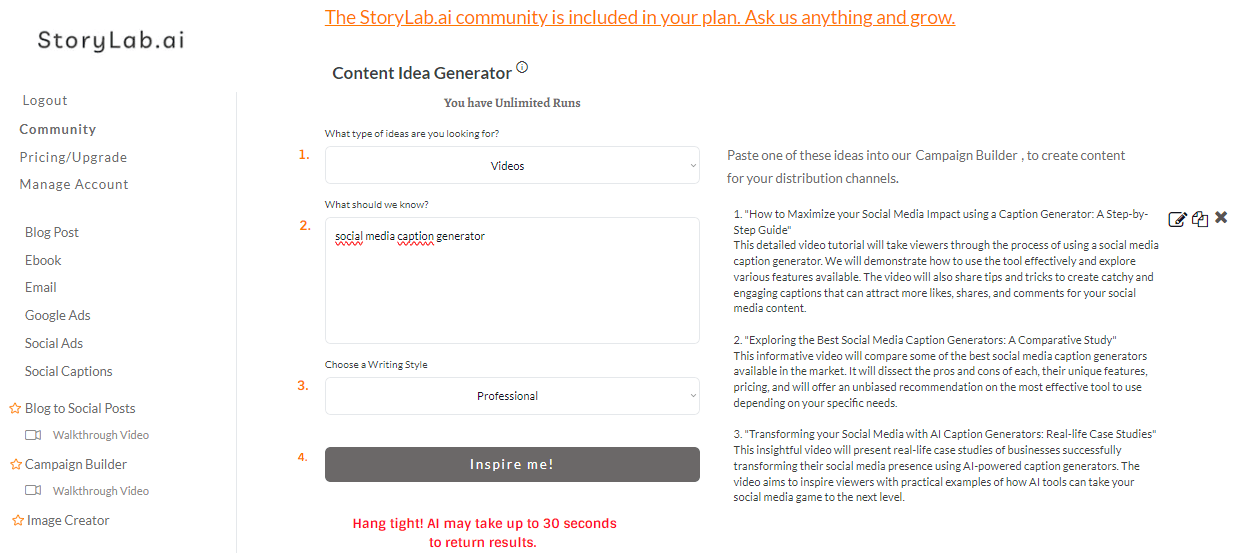
Video Idea Generator Professional style example

Video Idea Generator Output Examples

1. How to Maximize your Social Media Impact using a Caption Generator: A Step-by-Step Guide
This detailed video tutorial will take viewers through the process of using a social media caption generator. We will demonstrate how to use the tool effectively and explore various features available. The video will also share tips and tricks to create catchy and engaging captions that can attract more likes, shares, and comments for your social media content.

2. Exploring the Best Social Media Caption Generators: A Comparative Study
This informative video will compare some of the best social media caption generators available in the market. It will dissect the pros and cons of each, their unique features, pricing, and will offer an unbiased recommendation on the most effective tool to use depending on your specific needs.

3. Transforming your Social Media with AI Caption Generators: Real-life Case Studies
This insightful video will present real-life case studies of businesses successfully transforming their social media presence using AI-powered caption generators. The video aims to inspire viewers with practical examples of how AI tools can take your social media game to the next level.

Pretty cool, right?

I can re-run the Idea Generator a couple of times with the same input. I can switch up the style, I can input a different prompt and I can build a list of new video ideas within minutes with the help of AI based on data from our own YouTube channel.

Best Practices for coming up with new Video Ideas

Best Practices for coming up with new Video Ideas

When it comes to generating new video ideas, creativity and innovation are key, but there are also structured approaches you can take to ensure a steady flow of ideas. Here are some best practices to help you come up with new video ideas:

Understand Your Audience

  • Research your audience: Know their interests, problems, and questions. Tools like Google Trends, social media listening, and comments on your videos can provide insights.
  • Create viewer personas: Develop detailed profiles of your typical viewers, including their demographics, interests, and online behavior.

Keep an Idea Journal

  • Regular entries: Make it a habit to jot down any idea, no matter how big or small, and review these entries regularly.
  • Digital or paper: Use whichever format you’re more likely to use consistently. There are apps designed for note-taking that can be particularly effective.

Leverage Trends and Current Events

  • Trend analysis: Stay on top of trends in your niche by using tools like Google Trends, YouTube’s Trending page, and relevant hashtags on social media.
  • React to current events: Create content that relates to current events or trending topics, tailored to your audience’s interests.

Collaborate with Others

  • Partner with other creators: Collaboration can introduce your content to new audiences and bring fresh ideas and perspectives.
  • Engage with your community: Ask your viewers directly what content they want to see, or host Q&A sessions to gather ideas.

Use Content Idea Generators

  • Online tools: Utilize online content idea generators. These can spark ideas you might not have considered.
  • Competitor analysis: Look at what others in your niche are doing. Don’t copy, but think about how you can put a unique spin on popular formats or topics.

Cross-Pollinate Ideas Between Different Media

  • Books, podcasts, and articles: Draw inspiration from a variety of sources. You might find a concept in a book that could be adapted into an interesting video.
  • Adaptation: Consider how you might take an existing idea and adapt it for your audience or niche, whether it’s turning a blog post into a video series or using a podcast discussion as a springboard for a video topic.

Experiment and Analyze

  • Test new formats: Don’t be afraid to try something new. Use analytics to understand what works and what doesn’t.
  • Iterate: Use feedback and performance data to refine your ideas and approach.

Set Up Google Alerts

  • Stay informed: Set up alerts for key terms related to your niche to stay informed about the latest news, which can inspire new content.

Attend Industry Events and Conferences

  • Networking and learning: These can be great places to gather new ideas and understand emerging trends in your field.

Mind Mapping

  • Idea visualization: Use mind mapping tools to brainstorm and visually organize your thoughts. This can help in connecting different ideas to create something new.

Scheduled Brainstorming Sessions

  • Routine creativity: Set aside regular times for brainstorming sessions, alone or with your team, to generate and discuss new ideas.

By implementing these practices, you can continuously generate fresh and relevant video content ideas, keeping your audience engaged and growing your channel.

How to find video ideas that match your nonprofit marketing goals

Not every video idea is worth creating. A good idea is not just interesting. It should also support a real goal.

For a nonprofit, that goal might be raising awareness, increasing donations, growing an email list, attracting volunteers, promoting an event, or helping people understand a complex issue. When you start with the goal, it becomes much easier to filter ideas.

For example, if your goal is awareness, educational videos and myth-busting content may be a strong fit. If your goal is donor trust, impact stories and behind-the-scenes updates may work better. If your goal is volunteer recruitment, you may want videos that show community, purpose, and real experiences from current volunteers.

This approach helps you avoid random content and build a video library that actually supports your marketing efforts.

How AI can help you generate better video ideas faster

AI can be very useful during the idea stage because it helps you move from a vague topic to a list of possible directions.

You can start with a broad phrase like food insecurity, animal rescue, youth education, or climate action. Then use AI to generate audience questions, emotional angles, short-form hooks, explainer video concepts, campaign tie-ins, and follow-up topics. One idea can quickly turn into ten.

This is especially helpful for small teams that do not have time for long brainstorming sessions. AI can help you explore styles, tones, and formats much faster than starting from a blank page every time.

The strongest workflow is usually simple. Start with a core topic, add audience context, define the goal, and ask AI to generate video ideas that fit that situation. Then choose the ideas that feel most relevant, realistic, and aligned with your message.

Best places to find video ideas beyond AI

AI is helpful, but it should not be your only source of inspiration.

Some of the best video ideas come from audience questions, comments on social media, donor conversations, volunteer feedback, internal team discussions, webinars, blog posts, newsletters, and frequently asked questions on your website. If people keep asking something, that topic is often worth turning into a video.

You can also look at your best-performing content. A blog post that attracted strong traffic may become a video series. A webinar can become short educational clips. A social media post with strong engagement can point you toward a bigger topic worth exploring.

For nonprofits, real-world mission work is another strong source. Campaign updates, field stories, lessons learned, volunteer moments, and common misconceptions can all become meaningful video content.

Video idea categories nonprofits can use again and again

One reason teams get stuck is because they treat every new video like a completely new project. A better approach is to build repeatable categories.

A nonprofit can create educational videos that explain the issue it works on. It can create impact videos that show results and stories from the field. It can publish campaign videos that support fundraising or event promotion. It can share team and volunteer stories to make the mission feel more human. It can also create quick answer videos that respond to common questions.

These categories make planning easier because you are no longer searching for ideas from scratch. You are filling proven content buckets with new angles, examples, and stories.

That kind of structure also makes AI prompts better, since the tool has a clearer direction from the start.

How to turn one topic into multiple video ideas

A strong topic should almost never lead to just one video.

Let’s say your nonprofit wants to talk about food waste. That single topic can become an explainer video, a short myth-busting clip, a volunteer interview, a donor impact story, a community tip video, a campaign update, and a call-to-action video tied to a local event.

This is one of the easiest ways to build a sustainable content pipeline. Instead of hunting for brand-new topics every week, you expand the value of topics that already matter to your audience.

AI can help here by suggesting different formats, tones, and audience angles. You still choose what fits best, but the brainstorming becomes much faster and more practical.

How to validate a video idea before you spend time creating it

Not every idea deserves a full production workflow. Before you commit, ask a few simple questions.

Does this topic matter to the audience you want to reach? Does it support a real marketing or nonprofit goal? Can the message be made clear quickly? Do you already have stories, examples, or insights that make the idea worth watching?

You can also test ideas in smaller ways before making a bigger video. Turn the topic into a social post. Ask your audience a question in a newsletter. Mention it in a short clip and see how people respond. Review your analytics to see whether similar topics have already performed well.

This kind of validation can save time and help your team focus on ideas with stronger potential.

A simple workflow for coming up with video ideas consistently

The easiest way to stay consistent is to stop relying on inspiration alone.

Set aside regular time to collect ideas from audience questions, campaign themes, internal conversations, and analytics. Group those ideas into a few content categories. Then use AI to expand the strongest topics into multiple video angles.

From there, choose the best ideas based on audience fit, effort level, and business or nonprofit value. Keep a simple backlog so your team always has options ready when it is time to script and publish.

Consistency becomes much easier when idea generation is treated like a process, not a last-minute scramble.

FAQ

How do I come up with video ideas?

Start with your audience, goals, and common questions. Then look at your existing content, analytics, community feedback, and use AI to expand good topics into several video angles.

What makes a good video idea?

A good video idea is relevant to your audience, tied to a clear goal, easy to understand, and strong enough to hold attention quickly.

Can AI generate video ideas?

Yes. AI can help brainstorm topics, hooks, formats, questions, and content angles based on your niche, audience, and marketing goals.

How can nonprofits find video ideas?

Nonprofits can find video ideas by looking at donor questions, volunteer stories, campaign themes, impact updates, social comments, FAQs, and educational topics related to their mission.

Should I use trends to come up with video ideas?

Trends can help, but they should fit your audience and message. It is usually better to connect trends to your mission than to chase them without a clear purpose.

How many video ideas should I generate at once?

It is often better to generate several ideas around one topic rather than search for unrelated topics. That makes your content planning more focused and easier to sustain.

Can one topic become multiple videos?

Yes. One strong topic can often be turned into educational videos, short clips, testimonials, campaign content, FAQs, and social-first content.

What is the biggest mistake when choosing video ideas?

A common mistake is choosing ideas that sound interesting but do not match your audience, your goals, or your overall content strategy.

There you have it. Whenever you need to come up with new video ideas. Check YouTube, and your existing data, and use an AI Video Idea Generator together to find new ways to engage your audience with the amazing power of video.

Check out our latest Content

Articles, Images, Videos, and more!

Get a Christian Coloring Book this Christmas

Christian Coloring Book for Kids

Never get Stuck – Ask the AI Buddy Anything

AI Gardening App

Convert Text into any Case

Free Case Converter

Pros and Cons of Shopping

Online vs Traditional Shopping

Epic YT Title Examples

Fitness YT Title Examples

Earn $2000 a month!

AI Side Hustles from Home

Latest Videos