Best AI-Powered Social Media Caption Generators for 2024 [Start For Free]
The future is here! AI will probably not replace you as a social media marketer, but someone that uses AI and other marketing tools more efficiently might. The AI Social Media Caption Generators in this article come with a free trial. Be sure to check them out and learn how to use them to your advantage.

Do you want to improve your Social Media Marketing efforts? Having the right tools can help you boost your performance drastically.
Social media caption generators can help you unlock your creativity and come up with catchy, attention-grabbing captions for your posts. With the right ai tool, you can easily brainstorm ideas, find the perfect words to capture your message, and make sure your posts stand out from the crowd.
First this: Grow faster than ever before!
Seamlessly blend creativity and technology. See how you can start with AI Marketing and reach your goals faster than ever before. Check out the Tips, Strategies, AI Tools, Masterclass, Courses, and Community. Unleash the true potential of your brand with the help of AI.

Chapters
- What is an AI-Powered Social Media Caption Generator?
- The Benefits of an AI-Powered Social Media Caption Generator
- The Best AI-Powered Social Media Caption Generators
- 1. StoryLab.ai’s AI-Powered Social Media Caption Generator
- Get 25 Social Media Captions from one blog post
- 2. Writersonic AI Social Media Caption Generator
- 3. Hypotenuse AI Social Media Caption Generator
- 4. Notion AI Social Media Caption Generator
- Best Practices – How to Create Social Media Captions with AI
- FAQ
- More AI Tools

What is an AI-Powered Social Media Caption Generator?
An AI-Powered Social Media Caption Generator is a tool that helps people quickly create captions for their social media posts. It can provide ideas for captions, as well as generate captions from templates. Some can also suggest relevant keywords and hashtags.
AI social media caption generators use algorithms and natural language processing techniques to analyze the content of the post, extract key information, and generate relevant and engaging captions that can accompany the post on social media platforms.
The purpose of an AI social media caption generator is to assist users in creating captivating and attention-grabbing captions without having to brainstorm or spend a lot of time on writing them. It can be particularly useful for individuals or businesses managing multiple social media accounts and looking to streamline their social media content creation process.
An AI social media caption generator may take various factors into account when generating captions, such as the type of content (photo, video, or text), the intended audience, the tone or style desired, and any specific keywords or hashtags to be included. The generated captions can be modified or personalized by the user before being posted on social media platforms.

The Benefits of an AI-Powered Social Media Caption Generator
AI Social Media Caption Generators will benefit every social media marketer differently. Here are the most common benefits for using an AI-Powered Social Media Caption Generator.
Save Time
Generate captions in seconds, instead of spending hours brainstorming. Automatically suggest relevant keywords and hashtags. Create consistent captions for your brand. Generating captivating and engaging captions can be time-consuming. AI-powered caption generators automate this process, saving users valuable time and effort. With just a few clicks, users can obtain ready-to-use captions, reducing the need for manual brainstorming and writing.
Unlock Your Creativity
Generate ideas for captions that you may not have thought of before. Use templates to quickly create captions that are tailored to your brand. AI algorithms can generate a wide range of creative and diverse captions, helping users avoid repetitive or stale content. The algorithms analyze large amounts of data to identify trending phrases, popular styles, and effective writing techniques, resulting in fresh and attention-grabbing captions.
Consistency
Maintaining a consistent brand voice and tone across social media platforms is essential. AI caption generators can be trained or configured to align with a specific brand’s style, ensuring a cohesive and professional presence on social media. This consistency enhances brand recognition and builds audience trust.
Engagement and Audience Reach
Well-crafted captions have the power to captivate and engage social media users. AI-generated captions are designed to maximize audience reach and interaction by incorporating relevant keywords, trending topics, and effective storytelling elements. This can help increase likes, comments, shares, and overall engagement rates.
Improved Content Quality
AI algorithms can analyze the context and content of a post to generate captions that are relevant and contextually appropriate. This ensures that the captions complement the visuals or message of the post, resulting in higher-quality content that resonates with the target audience.
Trend Awareness
Social media trends and popular hashtags are constantly evolving. AI caption generators stay updated with the latest trends and can suggest relevant hashtags or phrases to increase the visibility and discoverability of posts. This helps users stay current and align their content with what is resonating with the online community.
Customization and Personalization
While AI-generated captions provide a starting point, users have the flexibility to customize and personalize the suggestions according to their preferences. They can add their own flair, incorporate specific branding elements, or make adjustments to align with their unique style and voice.
It’s important to note that AI-generated captions should be reviewed and edited by users to ensure accuracy, relevance, and alignment with their specific goals and brand guidelines. AI caption generators serve as powerful tools to enhance social media content creation and save time, while still allowing for human creativity and input.

The Best AI-Powered Social Media Caption Generators
Alright. Now that we know what AI Social Media Caption Generators are and why social media marketers should use them (or at least try them out), let’s have a look at some of the best AI social media caption makers.
1. StoryLab.ai’s AI-Powered Social Media Caption Generator
StoryLab.ai had been developing its AI Marketing Toolkit for years and the Social Media Caption Generator is an all-time favorite amongst users. You can set up a free account and give it a try.
Here’s what it looks like. Let’s say I want to create some social media captions to promote our social media marketing course. My input was: ‘Start our social media marketing course’.
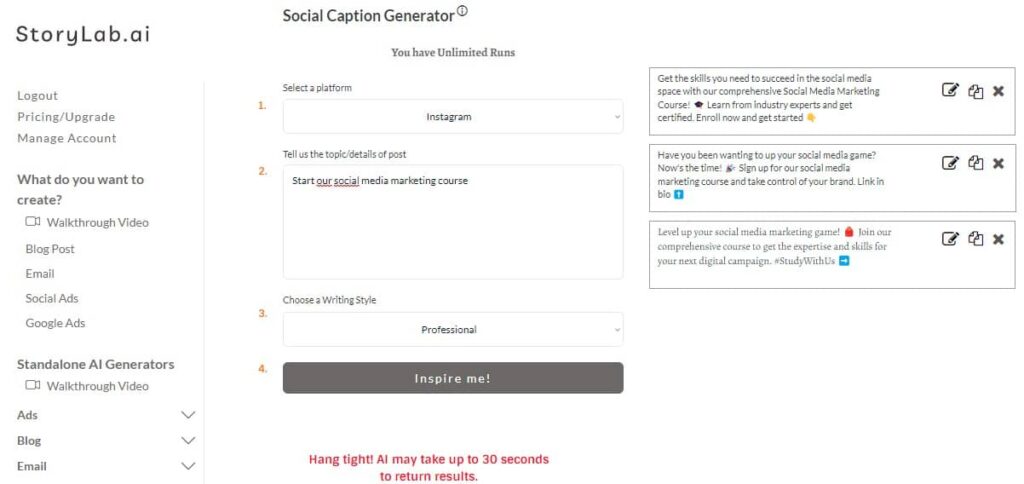
Social Media Caption Generator output examples:
- Get the skills you need to succeed in the social media space with our comprehensive Social Media Marketing Course! 🎓 Learn from industry experts and get certified. Enroll now and get started 👇
- Have you been wanting to up your social media game? Now’s the time! 🎉 Sign up for our social media marketing course and take control of your brand. Link in bio ⬆️
- Level up your social media marketing game! 🎒 Join our comprehensive course to get the expertise and skills for your next digital campaign. #StudyWithUs ➡️
I decided to run the tool again and got the following caption inspiration pieces
- Get ahead of the competition with our social media marketing course! Whether you’re just starting out or an experienced professional, our comprehensive curriculum will give you the skills and strategies to excel in this industry. Sign up now ➡️
- Learn the ABCs of social media marketing with our comprehensive online course. Unlock the secrets to success in organic and paid campaigns, analytics, strategy and more. Our courses are designed for all levels — start yours today! 💻
- Ready to take your social media game up a notch? Our Social Media Marketing Course is now available! Learn how to successfully structure, manage and build an engaged community of followers. Enroll today 💻🤝 #socialmediamarketingcourse
Because it’s so easy and I really want this social post to do well, I decided to generate one last batch:
- Need to kick-start your social media marketing? 🤩 Look no further! Our comprehensive Social Media Marketing course will help you get up and running in no time. Check it out today ➡️
- Ready to get your social media game on point? 🔥 Learn the fundamentals of social media marketing from the comfort of home with our new course! Sign up now to start mastering social media. #MarketingMadeEasy ✨
- Kickstart your marketing career with our Social Media Marketing Course! 🤩 Learn strategies on how to create meaningful, engaging content for your social media campaigns. Sign up today and get started! ➡️
Now that I’m well inspired, I can create a social media caption that really fits my tone of voice and offering in seconds.
StoryLab.ai AI Social Media Caption Generator benefits:
| 🤖 AI modes | 13 writing styles |
| ✍️ Improves | Social media captions, creativity, and more |
| 📖 Support | 17+ Languages |
| 💲 Price | Free and Premium |
Get 25 Social Media Captions from one blog post
StoryLab.ai also has a blog to social generator that allows you to generate up to 25 social media captions with one click. All you need to do is copy/paste a snippet from your blog post. Here’s how it works:
2. Writersonic AI Social Media Caption Generator
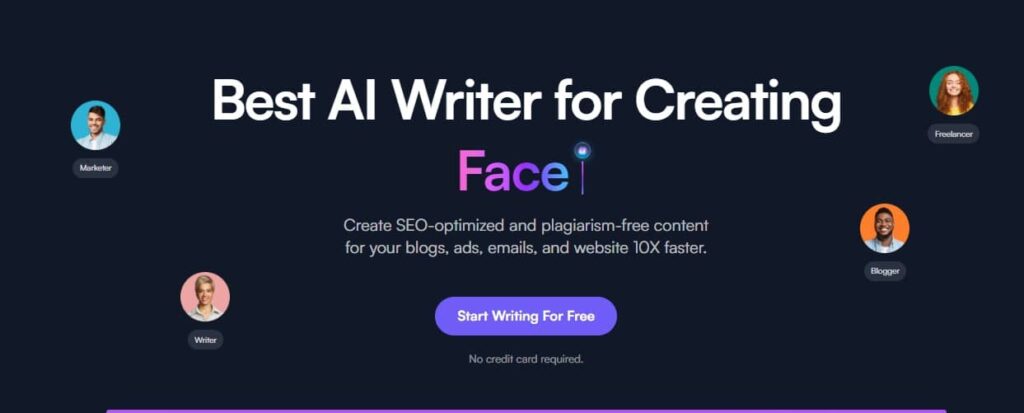
Writersonic is a great AI-Powered tool with a dedicated team of professionals that are constantly improving the tech and tens of thousands of users loving the outputs they receive. Next to the AI Social Media Caption Generator, Writersonic has over 100 cool other features you can try out.
3. Hypotenuse AI Social Media Caption Generator
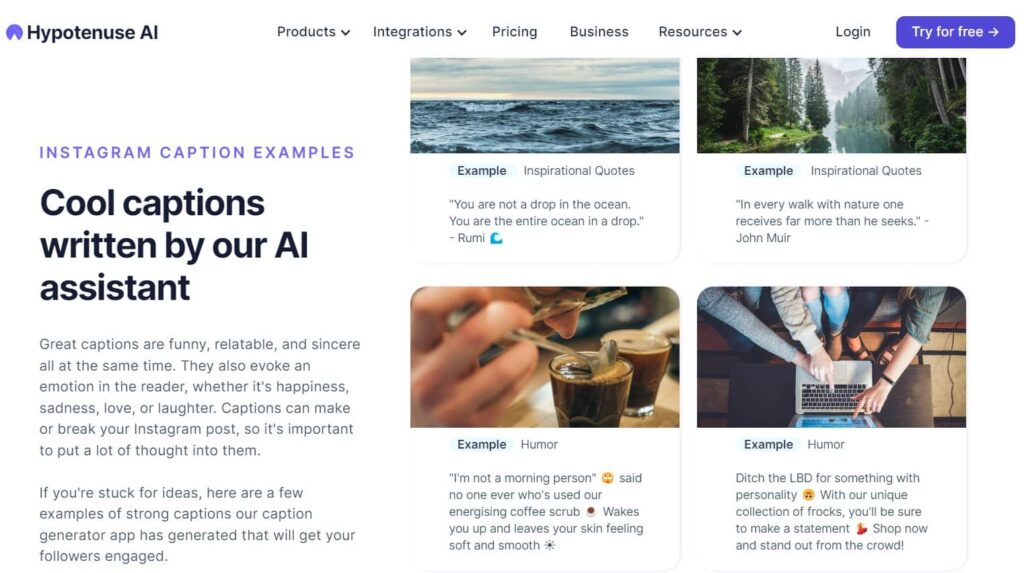
Hypotenuse has a great social media caption generator that is also powered by AI.
You can generate up to 15 free social media captions on their trial, in addition to other writing templates and tools. After that, generating more captions consistently requires a plan subscription.
4. Notion AI Social Media Caption Generator
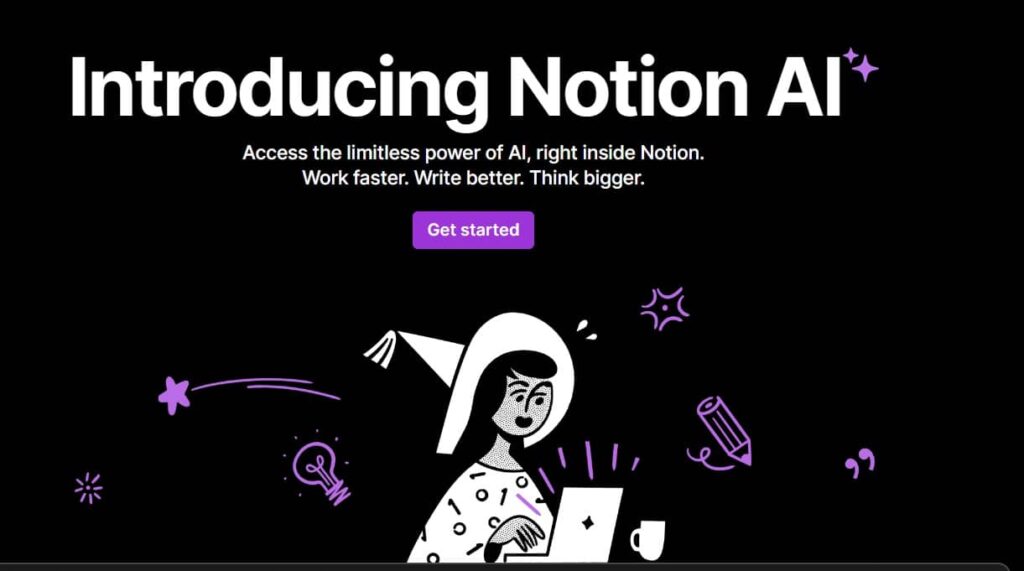
Notion is a great tool to write and create content. Alone or with others. You can set up a free Notion account and see how cool their built-in tools are and you can buy the AI Add-on for $10 a month (per user).
Notion is proud that its toolset can help professionals achieve their goals, meaning they can cancel other tooling subscriptions. Notion is a really cool all-in-one content creation platform.
Best Practices – How to Create Social Media Captions with AI

Creating captivating social media captions with AI involves a combination of creativity, data-driven insights, and strategic thinking.
Here’s a step-by-step guide to help you craft engaging social media captions with the help of AI that resonate with your audience:
Step 1: Define Your Audience and Goals Before you begin, identify your target audience and the specific goals of your social media post. Just because you’re using AI does not mean you can skip this step. Are you aiming to increase brand awareness, drive website traffic, or promote a product? Understanding your audience’s preferences and needs will guide your caption creation process.
Step 2: Gather Relevant Keywords Research relevant keywords and phrases that are aligned with your post’s theme and your brand. These keywords will help optimize your caption for searchability and improve its chances of reaching a wider audience. This is especially the case for social media platforms like Pinterest and TikTok. But adding the right keywords in the social media caption helps to grab people’s attention. If your social media post is about red dresses, use that keyword in your post.
Step 3: Utilize AI-Powered Tools Explore AI-powered tools designed to assist in generating social media captions. These tools analyze your content and provide suggestions based on the context, tone, and keywords. They can help spark your creativity and save time in the creation process. We already shared a couple of great AI Social Media Caption Generators in the article. We’re sure you’ll be able to find the one that works best for your from the list.
Step 4: Craft a Compelling Hook Start your social media caption with an attention-grabbing hook that piques curiosity or invokes emotion. A strong opening will entice readers to continue reading and engage with your post. be sure to include your main keyword in there as well.
Step 5: Convey Value or Benefit Clearly communicate the value or benefit your audience will gain from engaging with your post. Whether it’s entertainment, education, or a solution to a problem, make sure your caption addresses the “what’s in it for me” aspect.
Step 6: Keep it Concise Social media platforms have character limits, so keep your social caption concise and to the point. Use impactful language to convey your message effectively within the allowed space.
Step 7: Embrace Creativity and Brand Voice Inject creativity and personality into your social captions. Infuse your brand’s unique voice and style to make your captions instantly recognizable and relatable to your audience. Don’t take what AI Social Media Caption Generators created for you and copy/paste that on social. Add your unique tone of voice. AI is here to help spark creativity.
Step 8: Include a Call-to-Action (CTA) Encourage user engagement by incorporating a clear and relevant call-to-action. Whether it’s liking, commenting, sharing, or visiting your website, guide your audience on the next steps you want them to take.
Step 9: Use Emojis and Hashtags Emojis and relevant hashtags can add visual appeal and increase discoverability. Choose emojis that complement your message, and use hashtags that are popular within your niche to broaden your reach.
Step 10: Review and Test Before hitting the publish button, review your caption for clarity, grammar, and tone.
Step 11: Analyze and Iterate After your post is live, analyze the performance of your captions using social media analytics. Monitor engagement metrics such as likes, comments, shares, and click-through rates. Use these insights to refine your approach and continually improve your caption-writing skills.
By following these steps and incorporating AI-powered tools, you’ll be well-equipped to create social media captions that captivate your audience and drive meaningful interactions.
Conclusion
The future is here! AI will probably not replace you as a social media marketer, but someone that uses AI and other marketing tools more efficiently might.
The AI Social Media Caption Generators we shared in this article come with a free trial. Be sure to check them out and learn how to use them to your advantage.
FAQ
Q: What is an AI-powered social media caption generator?
- An AI-powered social media caption generator is a tool that uses artificial intelligence to create engaging and relevant captions for social media posts based on input keywords, themes, or images.
Q: How does an AI caption generator work?
- These generators use natural language processing (NLP) and machine learning algorithms to analyze input data and generate captions that are contextually relevant and linguistically coherent.
Q: What are the benefits of using AI for generating social media captions?
- Benefits include saving time, generating creative and diverse caption ideas, maintaining a consistent posting schedule, and improving engagement through optimized and personalized content.
Q: Can AI caption generators personalize captions for different social media platforms?
- Yes, many AI caption generators can tailor captions to suit the tone, style, and character limits of different social media platforms, like Instagram, Twitter, or Facebook.
Q: How accurate are AI-generated captions?
- AI-generated captions are generally accurate but may occasionally require manual tweaking for context-specific nuances or brand-specific voice and style.
Q: Are AI caption generators suitable for all types of businesses?
- They are suitable for a wide range of businesses, but it’s important to ensure that the generated captions align with the brand’s tone and values and are appropriate for the target audience.
Q: Can these tools suggest hashtags along with captions?
- Many AI caption generators also provide relevant hashtag suggestions, helping to increase the reach and discoverability of social media posts.
Q: How do AI caption generators handle different languages?
- Advanced AI caption generators support multiple languages, allowing users to create captions in different languages based on their audience demographics.
Q: Is it possible to integrate AI caption generators with social media management tools?
- Some AI caption generators can be integrated with social media management tools, streamlining content creation and scheduling across various platforms.
Q: What are the limitations of using AI for social media captions?
- Limitations include occasional lack of context understanding, inability to capture brand-specific nuances without manual input, and the need for periodic human oversight to ensure relevance and accuracy.
Q: How can businesses ensure brand consistency using AI caption generators?
- Businesses can ensure brand consistency by customizing AI settings to reflect their brand voice and style, and by manually reviewing and tweaking generated captions as needed.
Q: What types of content can AI caption generators create captions for?
- AI caption generators can create captions for a variety of content types, including images, videos, blog posts, and product promotions, adapting the tone and style to fit each post.
Q: How do AI caption generators improve social media engagement?
- By generating creative, relevant, and targeted captions, these tools can enhance engagement, encouraging likes, shares, and comments from the audience.
Q: Can AI caption generators be trained on specific company data or themes?
- Some advanced AI caption generators offer customization options where they can be trained on specific company data or themes to better align with the unique aspects of a brand.
Q: Are AI-generated captions suitable for SEO purposes?
- While AI-generated captions can be optimized for keywords, manual optimization may be necessary to fully align with SEO strategies, especially for nuanced or competitive keywords.
Q: How user-friendly are AI caption generators for those without technical expertise?
- Most AI caption generators are designed to be user-friendly, requiring minimal technical expertise, with simple interfaces and straightforward input methods.
Q: Can AI caption generators help in creating multilingual captions?
- Yes, some AI caption generators support multilingual capabilities, enabling businesses to cater to diverse audiences by generating captions in different languages.
Q: What are the costs associated with using AI caption generators?
- Costs vary depending on the tool, with some offering free basic services and others requiring a subscription or payment for advanced features and higher usage limits.
Q: How frequently are AI caption generators updated or improved?
- AI tools are typically updated regularly to improve accuracy, add new features, and adapt to changing language use and social media trends.
Q: Can AI caption generators reflect current trends or viral content?
- Advanced AI generators can incorporate current trends, viral themes, and popular phrases, making the captions more relatable and timely for the audience.
Q: How do AI caption generators handle humor and wit in captions?
- AI generators can incorporate humor based on training data, but the nuances of wit may vary. Users might need to tweak captions to align with specific humor styles or brand tones.
Q: Can AI caption generators suggest content ideas along with captions?
- Some AI generators offer content ideas or themes along with captions, helping users with not just text but also creative direction for their posts.
Q: Are there specific industries that benefit more from AI caption generators?
- Industries with a strong social media presence, like retail, entertainment, and hospitality, can particularly benefit from AI caption generators for regular and engaging content creation.
Q: How does AI handle industry-specific jargon or technical terms in captions?
- AI tools trained with industry-specific datasets can handle jargon and technical terms more effectively. However, industry-specific customization may be required for best results.
Q: Can AI caption generators be used for long-form content on platforms like LinkedIn?
- Yes, AI generators can be adapted to create long-form content suitable for platforms like LinkedIn, focusing on professional, informative, and network-oriented captions.
Q: How can nonprofits use AI caption generators effectively?
- Nonprofits can use AI caption generators to create impactful, emotive captions that resonate with their audience and convey their message effectively.
Q: What privacy concerns should be considered when using AI caption generators?
- Privacy concerns include ensuring that any personal data or proprietary information input into the AI tool is secure and not used beyond the intended purpose.
Q: Can AI caption generators adapt to different brand voices?
- AI generators can adapt to different brand voices if they are provided with enough examples or guidelines that capture the brand’s tone, language, and style.
Q: How can AI caption generators support social media managers?
- These tools support social media managers by reducing the time and effort spent on creating captions, allowing them to focus on strategy, engagement, and other creative tasks.
Q: Are there ethical considerations in using AI for social media content?
- Ethical considerations include the authenticity of AI-generated content, the potential for over-reliance on AI in place of human creativity, and ensuring that generated content is culturally sensitive and appropriate.
GlobalOwls Empowers you to become the best version of yourself
Check out the following resources and Grow!