YouTube SEO for Nonprofits: A Beginner’s Guide to More Reach
Build a larger audience by optimizing your YouTube videos. Follow our YouTube SEO step-by-step guide for beginners and reach your goals faster.

Awesome!
You are a Video Creator.
Are you getting the results you expected from YouTube’s algorithm? Did you pay any attention to your YouTube SEO?
Let’s see which steps you can take to improve your YouTube SEO in this step-by-step guide for beginners.
If your nonprofit is publishing videos to raise awareness, educate supporters, attract volunteers, or strengthen fundraising campaigns, YouTube SEO matters. Creating a helpful video is only part of the work. People still need to find it.
The good news is that beginner-friendly YouTube SEO does not have to be complicated. For most nonprofit teams, the biggest wins come from getting the basics right: choosing topics people actually care about, writing clear titles, creating strong thumbnails, organizing videos into useful playlists, and making each upload easier to understand inside YouTube Studio. AI can help speed up those tasks, especially for small teams that need to create more content without adding a huge production burden.
In this guide, you will learn how nonprofits can use YouTube SEO and AI-assisted workflows to give their videos a better chance of being discovered on YouTube and through Google video surfaces.
- What is YouTube SEO
- What is your main keyword?
- What is the searcher’s intent?
- What are your secondary keywords?
- Create great YouTube Titles and include the main keyword
- Create great YouTube Descriptions
- Add the right keywords
- Use your main keyword in your video
- Linkbuilding and embedding
- Why YouTube SEO matters for nonprofit marketing
- How nonprofits can choose YouTube topics with real search demand
- How AI can help nonprofits speed up YouTube SEO workflows
- Write YouTube titles that are clear, useful, and mission-aligned
- Create thumbnails that make nonprofit videos easier to understand
- Use descriptions, chapters, and playlists to build stronger topic relevance
- YouTube SEO for nonprofits is really about helping the right people find the right video
- How nonprofits can turn one YouTube video into an AI-powered content engine
- Over to you
- FAQ
Need better formatting fast? Try our free tools: case converter, title case converter, and sentence case converter.
What is YouTube SEO

YouTube SEO is using SEO best practices to improve the chances your video ranks well on YouTube and Google.
YouTube is the second-largest search engine in the world. You can optimize your videos and copy around them and rank better.
What is your main keyword?
What is the one keyword that you want to rank for on YouTube? Did you do your keyword research? Do you know how competitive the keyword is and how many people search for that keyword every month?
You need to understand this for every video you upload.
If you have your main keyword noted down, you can proceed to the next step.
What is the searcher’s intent?
It can happen that you know which keyword you want to rank for but that the searcher’s intent is different from your video content.
Let’s say you want to rank for ‘how to get rid of pimples. You created a video about ‘How going vegan can help you get rid of pimples in 6 months’, but everyone wants to know how to get rid of pimples fast. How do you know? Because all top 10 videos on this topic are about getting rid of them fast. Chances are that you won’t be able to rank in the top 10 position. YouTube has ran a ton of a/b tests and figured out that fast is what people want to know.
What are your secondary keywords?
Now that you know your perfect main keyword, search for relevant secondary keywords about the topic. You will need them for your Description and Keyword list.
Create great YouTube Titles and include the main keyword
Your YouTube titles serve three purposes:
- Let people know what the video is about;
- Let YouTube know what the video is about;
- Get people to click on your video.
You need to make sure your title:
- Is descriptive
- Is catchy
- Contains your main keyword
Because your title is so important, we advise you to create several titles and then select the best one.
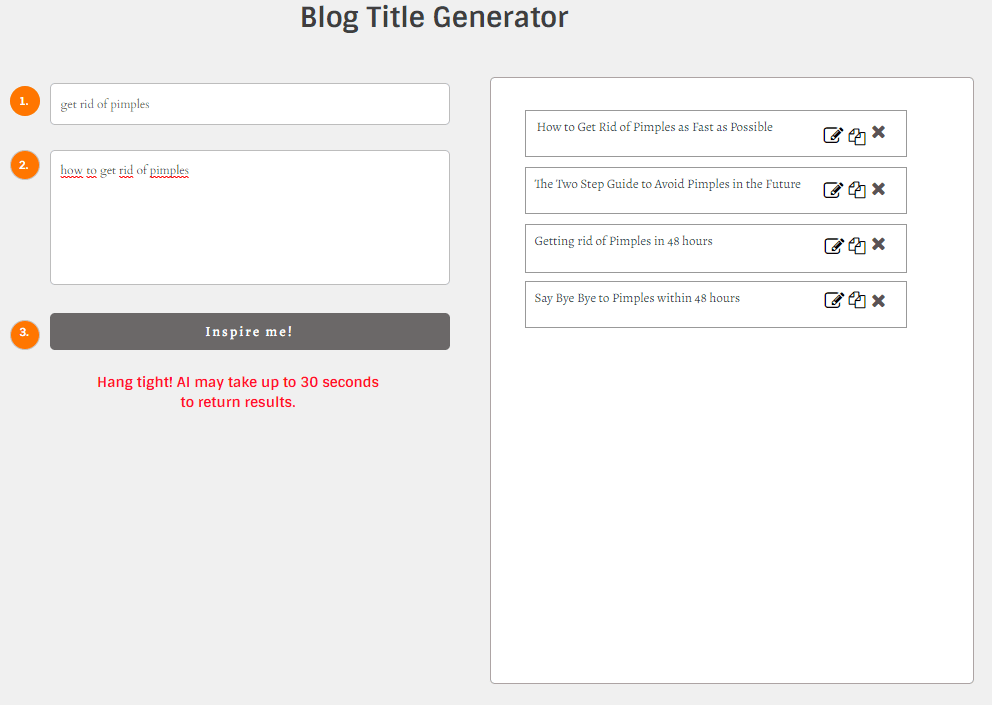
Check out how a YouTube Title Generator can help you do the heavy lifting.
Simply enter what your video is about and get title suggestions.
It’s then up to you to add your unique human touch and perfect your title.
Create great YouTube Descriptions
You can utilize your YouTube descriptions to further optimize your SEO and for getting people to watch additional videos you’ve created.
Be sure to include your main keyword at the start of your description and sprinkle secondary keywords throughout the rest of your description.
If you’re struggling to create great YouTube descriptions, or have a lot of videos published without a description, check out how a YouTube Description Generator can help do the heavy lifting.
Add the right keywords
For every video you publish, you have the opportunity to add keywords that are only visible to the search engine, not to users.
Make sure you make good use of that opportunity.
You should already have your list of main and secondary keywords because you needed them for your title and description. Simply add the keywords to the list.
Use your main keyword in your video
YouTube actually listens to your video. Are all signals (title, description, etc.) about getting rid of pimples, but you don’t mention it once in the video or only at the end? That’s a red flag for YouTube.
Be sure you actually talk about your primary keyword in your video. Preferably as soon as possible.
Linkbuilding and embedding
Links are not just important in traditional SEO. It’s also important for YouTube SEO.
After creating a video, be sure to also embed it where it makes sense on your website and build links to it.
Why YouTube SEO matters for nonprofit marketing
For nonprofits, YouTube is more than a video platform. It can support fundraising, volunteer recruitment, advocacy, education, donor trust, and long-term brand visibility. A strong video can keep working long after it is published, but only if people can discover it.
That is where YouTube SEO becomes valuable. Better video packaging helps supporters understand what your video is about before they click. Better organization helps YouTube understand your channel topics more clearly. Better descriptions and structure make it easier for viewers to keep watching and explore more of your content.
For nonprofit teams with limited time, this matters because one well-optimized video can support multiple goals at once. It can answer common questions, build trust, and keep your mission visible between campaigns.
How nonprofits can choose YouTube topics with real search demand
A lot of nonprofit video content starts with internal priorities. That makes sense, but it is even stronger when your topic also matches what people are already trying to learn, solve, or understand.
Start with questions your audience already asks. These may include:
- How your program works
- How donations are used
- What impact a campaign makes
- How to volunteer
- Why an issue matters right now
- What families, students, patients, or communities can expect from your services
This is where AI can help. You can use it to turn one campaign brief, one FAQ list, or one impact report into a larger set of video topic ideas, title angles, and content formats. Then your team can choose the ideas that best match your mission and audience.
How AI can help nonprofits speed up YouTube SEO workflows
AI should not replace your nonprofit voice, but it can remove a lot of friction from the publishing process. Small teams often lose time on repetitive tasks such as drafting titles, rewriting descriptions, creating chapter ideas, and repurposing one video into supporting content.
AI can help you:
- Generate title variations
- Draft description options
- Turn a transcript into chapter timestamps
- Create different hooks for donors, volunteers, or general supporters
- Repurpose one video into a blog intro, email summary, and social captions
- Brainstorm playlist names for your channel structure
This is especially useful for lean nonprofit marketing teams. Instead of spending too much time on first drafts, you can use AI to get a solid starting point and then shape the final version with your mission language, real examples, and human judgment.
Write YouTube titles that are clear, useful, and mission-aligned
Titles matter because viewers often see the title and thumbnail first. A strong title helps people instantly understand what your video is about and whether it matches what they need. YouTube’s own guidance emphasizes that thumbnails and titles are the first information many viewers use to decide whether to watch.
For nonprofits, good titles are usually clear before they are clever. A title such as “How Our Food Program Helps Local Families” is easier to understand than a vague phrase that hides the topic. A stronger title can still be engaging, but clarity should come first.
AI can help you test multiple versions of the same title, including:
- A donor-focused version
- A volunteer-focused version
- A search-friendly educational version
- A more emotional story-led version
That helps your team move faster without losing the message.
Create thumbnails that make nonprofit videos easier to understand
A thumbnail should help people understand the video at a glance. YouTube says viewers usually see the thumbnail and title first, and it notes that 90 percent of the best-performing videos have custom thumbnails.
For nonprofits, strong thumbnails often work best when they show:
- A real person
- A clear emotional moment
- A strong visual connection to the topic
- Simple, readable composition
- A look that matches your brand and mission
This does not mean every thumbnail needs dramatic design. It means each thumbnail should quickly tell viewers what kind of story, lesson, or update they can expect. If your title promises an impact story, the thumbnail should support that promise.
Use descriptions, chapters, and playlists to build stronger topic relevance
Descriptions help give context to your video, and YouTube Studio lets creators edit these details directly. Playlists help organize related content into clear topic paths. Google Search Central also notes that video key moments can be supported with timestamps and labels in YouTube descriptions, which can improve navigation and understanding.
For nonprofits, this opens up a useful workflow:
- Write a clear first sentence explaining the video
- Add a short paragraph about why the topic matters
- Include links to your campaign, donation page, volunteer page, or related resource
- Add timestamps for chapters when relevant
- Group related videos into playlists such as fundraising tips, impact stories, volunteer training, or cause education
This helps both viewers and platforms understand your content more clearly.
YouTube SEO for nonprofits is really about helping the right people find the right video
A lot of beginners think YouTube SEO is only about keywords. That is too narrow. Good YouTube SEO also depends on whether the video satisfies the viewer after the click. A helpful title gets attention, but the content still has to deliver.
For nonprofits, that means:
- Matching the title to the actual video
- Getting to the point early
- Making the video useful or emotionally meaningful
- Giving supporters a clear next step
- Building trust instead of chasing empty clicks
The best nonprofit YouTube SEO is not about gaming the platform. It is about making your mission easier to discover, easier to understand, and easier to engage with.
How nonprofits can turn one YouTube video into an AI-powered content engine
One nonprofit video should not live only on YouTube. With the right workflow, one strong video can become multiple content assets.
You can use AI to turn one video into:
- A blog post summary
- Instagram captions
- LinkedIn posts
- Email newsletter copy
- Short quote graphics
- YouTube chapter titles
- A donor-focused follow-up message
- A volunteer recruitment teaser
This is one of the most practical reasons to combine YouTube SEO with AI. Better optimization helps the original video get discovered. Better repurposing helps your nonprofit get more value from the effort it already invested.
Over to you
These were the most important steps you should take to optimize your YouTube videos to rank better.
We hope our YouTube SEO beginner’s guide and tools provided helps you build a larger audience and reach your goals faster.
FAQ
What is YouTube SEO for nonprofits?
YouTube SEO for nonprofits means improving your video titles, thumbnails, descriptions, playlists, and overall video structure so more people can discover your mission-driven content. It is especially useful for awareness videos, educational content, fundraising stories, and volunteer recruitment videos. YouTube says viewers often see the title and thumbnail first, while Google provides separate video SEO guidance for broader search visibility.
How can AI help nonprofits with YouTube SEO?
AI can help nonprofits draft titles, descriptions, chapter ideas, and repurposed content faster. It is most useful as a first-draft assistant for small teams that need to publish consistently without spending too much time on repetitive optimization tasks. YouTube Studio supports editing these details directly after upload.
Do thumbnails really matter for nonprofit YouTube videos?
Yes. YouTube states that viewers usually see the thumbnail and title first, and it notes that 90 percent of the best-performing videos have custom thumbnails. For nonprofits, a strong thumbnail can make an impact story, campaign update, or educational video easier to understand at a glance.
Should nonprofits spend time on YouTube descriptions and chapters?
Yes. Descriptions help add context, and chapter timestamps can improve navigation for viewers. Google Search Central explains that key moments can be supported through timestamps and labels in YouTube descriptions, which can help users engage more deeply with the content.
Do playlists help nonprofit YouTube SEO?
Playlists help organize related videos into clear topic groups, which makes your channel easier to navigate and can encourage more viewing across related content. This is useful for nonprofit channels that publish recurring content about campaigns, impact stories, educational topics, or volunteer resources.
Can nonprofit YouTube videos also appear in Google search results?
Yes. Google Search Central provides video SEO documentation that explains how video content can appear in Google Search and related features. That means a well-optimized nonprofit video may have discovery potential beyond YouTube itself.
What is YouTube SEO?
YouTube SEO involves optimizing your YouTube channel, playlists, metadata, descriptions, and videos to be easily discoverable by YouTube’s search engine.
How does the YouTube algorithm work?
The YouTube algorithm ranks videos based on various factors including relevance, watch time, viewer satisfaction signals like likes and comments, and the freshness of the content.
Why are keywords important in YouTube SEO?
Keywords help in categorizing your content and making it discoverable to viewers searching for specific topics on YouTube.
How can you effectively use keywords in YouTube videos?
Incorporate relevant keywords in your video titles, descriptions, and tags to improve visibility. Use keyword research tools to find the most effective keywords for your content.
What role do video thumbnails play in YouTube SEO?
Attractive and relevant thumbnails can increase the click-through rate (CTR) of your videos, which is a positive signal to the YouTube algorithm.
How important are video titles and descriptions for YouTube SEO?
Video titles and descriptions are crucial as they provide context to the YouTube algorithm and viewers, helping them understand what your video is about.
What is the significance of video watch time and engagement in YouTube SEO?
Higher watch time and engagement (likes, comments, and shares) signal to YouTube that viewers find your content valuable, improving your video’s ranking.
How can you optimize your YouTube channel for better SEO?
Optimize your channel by using relevant keywords in your channel description, creating a consistent posting schedule, and organizing videos into playlists.
What are the best practices for creating YouTube video tags?
Use a mix of broad and specific tags relevant to your video content. Include keywords, synonymous terms, and common search queries.
How can you measure the success of your YouTube SEO efforts?
Use YouTube Analytics to track metrics like view counts, watch time, subscriber growth, and ranking for specific keywords to measure the effectiveness of your SEO strategies.
Can closed captions or subtitles improve YouTube SEO?
Yes, adding closed captions or subtitles can improve SEO as they make your content accessible to a wider audience and provide additional text for YouTube’s algorithms to index.
How does video length impact YouTube SEO?
Longer videos have the potential to increase watch time, a key metric for YouTube’s SEO. However, the video should remain engaging to ensure viewers stay till the end.
Are collaborations with other YouTubers beneficial for SEO?
Collaborations can expose your content to a broader audience, potentially increasing views and engagement, which are beneficial for SEO.
How can playlist optimization enhance YouTube SEO?
Well-organized playlists can keep viewers engaged with your content longer, increasing overall channel watch time, a positive signal for SEO.
What’s the importance of the first 48 hours after video upload for SEO?
The first 48 hours are crucial as high engagement during this period can signal to YouTube that the video is popular and relevant, boosting its SEO ranking.
How do audience retention and drop-off rates affect YouTube SEO?
Higher audience retention and lower drop-off rates indicate engaging content, positively influencing your video’s SEO performance.
Can responding to comments on your videos improve SEO?
Engaging with comments can increase overall engagement on your video, a factor that YouTube considers when ranking content.
Is consistency in uploading videos important for YouTube SEO?
Regular and consistent uploading can keep your audience engaged and returning to your channel, which is beneficial for SEO.
How does linking to videos from external sites affect SEO?
External links to your videos can drive additional traffic and increase the perceived authority and relevance of your content, positively impacting SEO.
Should you repurpose content from other platforms for YouTube?
Repurposing content can be effective, but it should be optimized for YouTube’s audience and format to ensure it aligns with SEO best practices.
How important is the video quality for YouTube SEO?
High video quality can improve viewer engagement and watch time, which are key factors in YouTube’s SEO algorithm.
Can user-generated content like comments and video responses impact SEO?
Yes, user-generated content such as comments and video responses increase engagement and can provide additional keywords, positively impacting SEO.
How does customizing video thumbnails relate to SEO?
Custom thumbnails that are clear and visually appealing can increase click-through rates (CTR), which is a positive signal for YouTube’s algorithm.
What is the role of video file names in YouTube SEO?
Using descriptive file names with relevant keywords before uploading can give YouTube’s algorithm more context about your content, aiding in SEO.
How effective are end screens and annotations in improving SEO?
End screens and annotations can drive viewers to more of your content, increasing watch time and channel engagement, which are beneficial for SEO.
Does promoting YouTube videos on other social platforms help with SEO?
Promoting videos on other platforms can increase view counts and broaden your audience, indirectly benefiting your video’s SEO on YouTube.
How can channel keywords be optimized for YouTube SEO?
Use relevant and specific channel keywords in your channel’s ‘About’ section to help YouTube understand the overall theme and content of your channel.
What impact do video descriptions have on YouTube SEO?
Well-written video descriptions with relevant keywords and information can provide context to YouTube’s algorithm and viewers, improving your video’s discoverability.
Can collaborating with brands or sponsored content affect YouTube SEO?
Brand collaborations and sponsored content, if relevant to your audience, can increase viewership and engagement, positively impacting SEO.
How important is it to stay updated with YouTube’s algorithm changes?
Staying informed about YouTube’s algorithm updates is crucial for adapting your SEO strategy and ensuring that your content continues to perform well.
Check out our latest Content
Articles, Images, Videos, and more!
Get a Christian Coloring Book this Christmas
Never get Stuck – Ask the AI Buddy Anything
Convert Text into any Case
Pros and Cons of Shopping
Epic YT Title Examples
Earn $2000 a month!
Latest Videos